Volver a Mods Ver en Nexus Mods
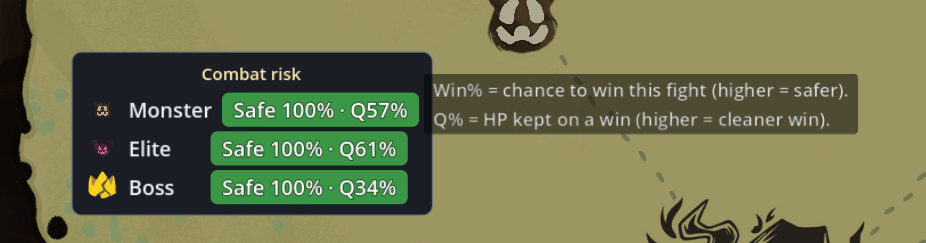
A Slay the Spire 2 map overlay that shows a combat-risk band — Safe / Caution / Danger — with a win-rate % and combat-quality % for the upcoming Monster / Elite / current-act Boss, before you pick a map node.
The estimate isn't a heuristic — it simulates the real STS2 combat engine in a separate headless helper process, using your current deck, relics, potions and HP. It is read-only and never touches your game state.
The final layout should be:
<game>/mods/Sts2WinratePreview/Sts2WinratePreview.dll
<game>/mods/Sts2WinratePreview/Sts2WinratePreview.json
<game>/mods/Sts2WinratePreview/helper/Sts2CombatCore.exe (+ runtime files) Launch the game and start a run — the band appears on the map. Windows x64. The helper is self-contained — no separate .NET install needed.
Built and tested on Slay the Spire 2 — public (default) branch, Steam build 23478716 (2026-06-02) (sts2.dll 0.1.0), Windows x64. STS2 is in Early Access; a game update — and the beta branch, which runs ahead of stable — can break the mod until it is updated. If the band stops appearing after a patch, check for a mod update.
Author: inggom
Jugabilidad
StS2 Winrate Preview
por Inggom0111v0.1.3
A map overlay that predicts your win-rate for the next Monster / Elite / current-act Boss before you pick a node — by simulating the real STS2 combat engine with your current deck, relics and potions. Read-only; a band (even 100%) is a
Creado
15 jun 2026
Actualizado
16 jun 2026
Descripción
Esta descripción la proporciona el autor del mod en Nexus Mods en inglés.
StS2 Winrate Preview
⚠ Requires a separate helper download (~42 MB) from GitHub — see Install below.
A Slay the Spire 2 map overlay that shows a combat-risk band — Safe / Caution / Danger — with a win-rate % and combat-quality % for the upcoming Monster / Elite / current-act Boss, before you pick a map node.
The estimate isn't a heuristic — it simulates the real STS2 combat engine in a separate headless helper process, using your current deck, relics, potions and HP. It is read-only and never touches your game state.
⚠ The band is a prediction, not a guarantee. Even a 100% does not promise a win — it's the AI playing your current deck against sampled draws/encounters, so it shows how a fight tends to go, not how your run will. Your own draws, targeting and decisions can still lose a "Safe" fight (or win a "Danger" one). Use it as guidance only.
Features
- A risk band per upcoming category (Monster / Elite / current-act Boss) on the map screen.
- Win-rate % + combat-quality % (HP you'd keep on a win), side by side.
- Real combat-engine simulation via a pooled headless helper — not a static formula.
- Aggregates over the whole act's encounter pool, so the band stays stable as you progress (only your deck / HP change it).
- Optional ModConfig settings — adjust the simulation trials per category (Monster / Elite / Boss, 1–10) in-game; more Boss trials = a steadier boss band. Without ModConfig the defaults apply.
- Draggable, dismissible panel; auto-hides whenever another screen (your deck / relic / potion view, pause, settings) is layered over the map.
- 16 languages. Hover the panel for a short legend of the two numbers.
How it works
- A headless helper (Sts2CombatCore, downloaded separately — see Install) runs the actual game combat engine out-of-process.
- When you open the map, the mod sends your current deck / relics / potions / HP to a pool of helper processes, which simulate each upcoming encounter to a win/loss.
- The band appears within ~1s per fight. Bigger machine → more helpers → faster refresh.
Install
- Have an STS2 mod loader set up.
- Extract this mod archive into your game's mods folder.
- Download the helper (~42 MB, required — it runs the real combat engine and is hosted on GitHub due to its size) and extract it into the same mods folder. Pick the build matching your game branch:
- Stable (default): Sts2WinratePreview-helper-v0.1.3-stable.zip
- Beta branch: Sts2WinratePreview-helper-v0.1.3-beta.zip
Configuration (optional — environment variables)
- STS2_WINRATE_HELPERS — parallel helper processes (default: auto). More = faster refresh.
- STS2_WINRATE_DECISION — search (default, more accurate) or plannern (faster).
- STS2_WINRATE_QUERY_TIMEOUT_MS — per-encounter timeout in ms (default 60000).
Notes
- The helper is a separate process; the first map-open spins it up (a brief one-time warm-up).
- affects_gameplay: false — the simulation is a disposable forecast; it does not auto-play or modify your run.
- Source / issues: github.com/ing-gom/sts2-winrate-preview
Compatibility
Built and tested on Slay the Spire 2 — public (default) branch, Steam build 23478716 (2026-06-02) (sts2.dll 0.1.0), Windows x64. STS2 is in Early Access; a game update — and the beta branch, which runs ahead of stable — can break the mod until it is updated. If the band stops appearing after a patch, check for a mod update.
Author: inggom